Notification
1.简介
Notification俗称通知,是指在应用程序之外显示的消息,其作用是以一种醒目的方式提醒用户。
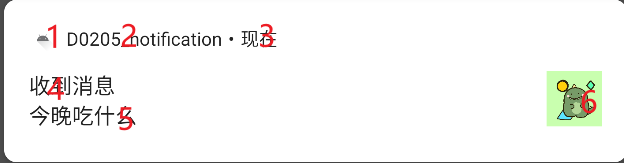
- 小图标
- 应用名称
- 时间戳
- 消息标题
- 消息文本
从Android 4.1到Android8.0,Notification也经历了一系列的行为变化,展现形式也呈现多样化,目前大体可分为状态栏图标通知、悬挂提醒式通知、锁屏通知及圆点通知。
Notification 对象必须包含以下内容:
- 小图标,由 setSmallIcon() 设置
- 标题,由 setContentTitle() 设置
- 详细文本,由 setContentText() 设置
2. Notification简单实现
- 创建一个NotificationManager来对通知进行管理。通过调用getSystemService(String s)方法获取到NotificationManager实例对象,字符串s参数用于确定获取系统的哪个服务.
NotificationManager notificationManager = (NotificationManager) getSystemService(NOTIFICATION_SERVICE);
- 针对8.0以上的手机要创建通知渠道
// 进行判断Android
if (Build.VERSION.SDK_INT >= Build.VERSION_CODES.O){
            NotificationChannel channel = new NotificationChannel("normal","普通通知",NotificationManager.IMPORTANCE_HIGH);
            notificationManager.createNotificationChannel(channel);
}- 使用builder构造器来创建Notification对象。需要注意的是,为了解决API不稳定性问题和新老版本的兼容问题,使用support-v4提供的NotificationCompat类的Builder构造器来创建Notification对象,可以保证程序在所有的版本上都能正常工作。
Notification chat = new NotificationCompat.Builder(this, "normal")
                    .setAutoCancel(true)
                    .setContentTitle("收到消息")
                    .setContentText("今晚吃什么")
                    .setWhen(System.currentTimeMillis())
                    .setSmallIcon(R.drawable.ic_launcher_foreground)
                    .setVisibility(NotificationCompat.VISIBILITY_PUBLIC)
                    .setLargeIcon(BitmapFactory.decodeResource(getResources(), R.drawable.name))
.build();- 发送通知
notificationManager.notify(1,chat);
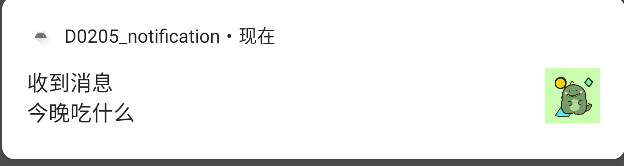
实现效果:
Builder构造器其中一些方法说明如下:
| setAutoCancel(boolean boolean) | 设置点击通知后自动清除通知 |
|---|---|
| setContent(RemoteView view) | 设置自定义通知 |
| setContentTitle(String string) | 设置通知的标题内容 |
| setContentText(String string) | 设置通知的正文内容 |
| setContentIntent(PendingIntent intent) | 设置点击通知后的跳转意图 |
| setWhen(long when) | 设置通知被创建的时间 |
| setSmallIcon(int icon) | 设置通知的小图标注意:只能使用纯alpha图层的图片进行设置,小图标会显示在系统状态栏上 |
| setLargeIcon(Bitmap icon) | 设置通知的大图标下拉系统状态栏时就能看见 |
| setPriority(int pri) | 设置通知的重要程度 |
| setStyle(Style style) | 设置通知的样式比如设置长文字、大图片等等 |
| setVisibility(int defaults) | 设置默认锁屏显示 |
| setLight(int argb, int onMs, int offMs) | 设置呼吸闪烁效果 |
| setSound(Uri sound) | 设置通知音效 |
| setVibrate(long[] pattern) | 设置震动效果,数组包含手机静止时长和震动时长 下标0代表手机静止时长 下标1代表手机整的时长 下标2代表手机静止时长 下标3,4,5…….以此类推 还需要在AndroidManifest.xml中声明权限: |
| setColor(int argb) | 设置通知栏颜色 |
| setCategory(String category) | 设置通知类别 |
| setFullScreenIntent(PendingIntent intent, boolean b) | 设置弹窗显示 |
展开式通知
大文本
Button sendNotification4 = findViewById(R.id.sendNotification4);
       sendNotification4.setOnClickListener(view -> {
           String msg = "这是大文本这是大文本这是大文本这是大文本这是大文本这是大文本这是大文本这是大文本这是大文本这是大文本这是大文本这是大文本这是大文本这是大文本这是大文本这是大文本这是大文本这是大文本这是大文本这是大文本这是大文本这是大文本这是大文本这是大文本这是大文本这是大文本这是大文本这是大文本这是大文本这是大文本这是大文本这是大文本这是大文本这是大文本这是大文本这是大文本这是大文本这是大文本这是大文本这是大文本这是大文本这是大文本这是大文本";
           Intent intent = new Intent(this,MainActivity.class);
           Bitmap bitmap = BitmapFactory.decodeResource(getResources(), R.drawable.name);
           PendingIntent pendingIntent = PendingIntent.getActivity(this,0,intent,0);

           Notification chat = new NotificationCompat.Builder(this, "normal")
                   .setStyle(new NotificationCompat.BigTextStyle().bigText(msg))
                   .setAutoCancel(true)
                   .setContentTitle("收到消息")
                   .setContentText("今晚吃什么!")
                   .setWhen(System.currentTimeMillis())
                   .setSmallIcon(R.drawable.ic_launcher_foreground)
                   .setContentIntent(pendingIntent)
                   .setVisibility(NotificationCompat.VISIBILITY_PUBLIC)
                   .setLargeIcon(bitmap)
                   .build();
           notificationManager.notify(3,chat);
       });
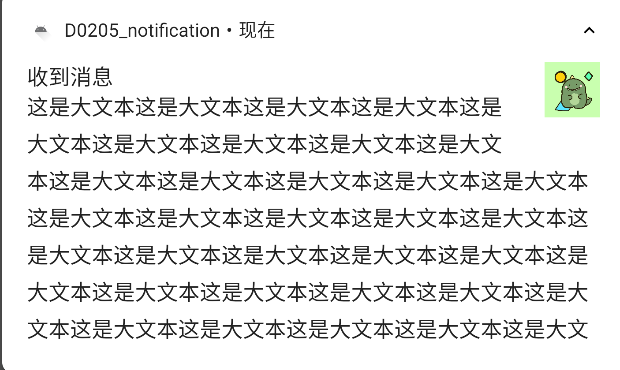
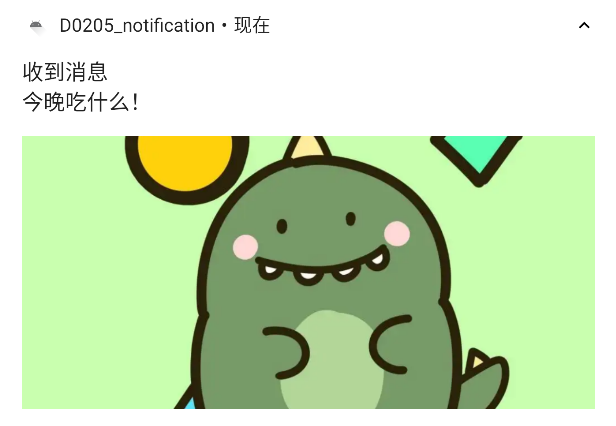
实现效果:
大图片
Button sendNotification3 = findViewById(R.id.sendNotification3);
        sendNotification3.setOnClickListener(view -> {
            Intent intent = new Intent(this,MainActivity.class);
            Bitmap bitmap = BitmapFactory.decodeResource(getResources(), R.drawable.name);
            PendingIntent pendingIntent = PendingIntent.getActivity(this,0,intent,0);

            Notification chat = new NotificationCompat.Builder(this, "normal")
                    .setStyle(new NotificationCompat.BigPictureStyle().bigPicture(bitmap).bigLargeIcon(null))
                    .setAutoCancel(true)
                    .setContentTitle("收到消息")
                    .setContentText("今晚吃什么!")
                    .setWhen(System.currentTimeMillis())
                    .setSmallIcon(R.drawable.ic_launcher_foreground)
                    .setContentIntent(pendingIntent)
                    .setVisibility(NotificationCompat.VISIBILITY_PUBLIC)
                    .setLargeIcon(bitmap)
                    .build();
            notificationManager.notify(3,chat);
        });
实现效果
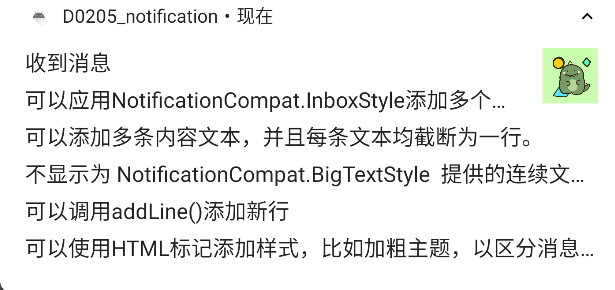
收件箱
Button sendNotification2 = findViewById(R.id.sendNotification2);
        sendNotification2.setOnClickListener(view -> {
            Intent intent = new Intent(this,MainActivity.class);

            PendingIntent pendingIntent = PendingIntent.getActivity(this,0,intent,0);

            Notification chat = new NotificationCompat.Builder(this, "normal")
                    .setStyle(new NotificationCompat.InboxStyle()
                            .addLine("可以应用NotificationCompat.InboxStyle添加多个简短摘要行。")
                            .addLine("可以添加多条内容文本,并且每条文本均截断为一行。")
                            .addLine("不显示为 NotificationCompat.BigTextStyle  提供的连续文本行。")
                            .addLine("可以调用addLine()添加新行")
                            .addLine("可以使用HTML标记添加样式,比如加粗主题,以区分消息主题和内容")
                    )
                    .setAutoCancel(true)
                    .setContentTitle("收到消息")
                    .setContentText("今晚吃什么!")
                    .setWhen(System.currentTimeMillis())
                    .setSmallIcon(R.drawable.ic_launcher_foreground)
                    .setContentIntent(pendingIntent)
                    .setVisibility(NotificationCompat.VISIBILITY_PUBLIC)
                    .setLargeIcon(BitmapFactory.decodeResource(getResources(), R.drawable.name))
                    .build();
            notificationManager.notify(3,chat);
        });
实现效果
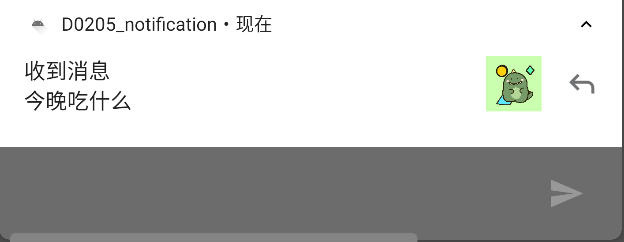
添加操作按钮
Button sendNotification = findViewById(R.id.sendNotification);
       sendNotification.setOnClickListener(view -> {
           Intent intent = new Intent(this,MainActivity.class);
           RemoteInput remoteInput = new RemoteInput.Builder("reply").build();
           final PendingIntent replyIntent = PendingIntent.getBroadcast(this, 2, new Intent("om.example.notification"),PendingIntent.FLAG_CANCEL_CURRENT);
           NotificationCompat.Action action = new NotificationCompat.Action.Builder(R.drawable.ic_launcher_foreground,"回复",replyIntent).addRemoteInput(remoteInput).build();
           PendingIntent pendingIntent = PendingIntent.getActivity(this,0,intent,0);
           Notification chat = new NotificationCompat.Builder(this, "normal")
                   .addAction(action)
                   .setAutoCancel(true)
                   .setContentTitle("收到消息")
                   .setContentText("今晚吃什么")
                   .setWhen(System.currentTimeMillis())
                   .setSmallIcon(R.drawable.ic_launcher_foreground)
                   .setContentIntent(pendingIntent)
                   .setVisibility(NotificationCompat.VISIBILITY_PUBLIC)
                   .setLargeIcon(BitmapFactory.decodeResource(getResources(), R.drawable.name))
                   .build();

           notificationManager.notify(1,chat);
       });
实现效果:
3.Notification通知渠道
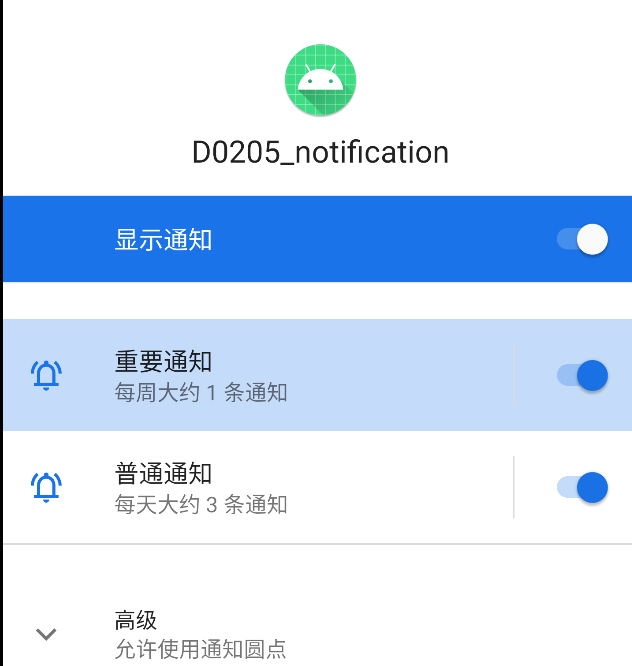
从Android 8.0系统开始,Google引入了通知渠道这个概念。
什么是通知渠道呢?顾名思义,就是每条通知都要属于一个对应的渠道。每个App都可以自由地创建当前App拥有哪些通知渠道,但是这些通知渠道的控制权都是掌握在用户手上的。用户可以自由地选择这些通知渠道的重要程度,是否响铃、是否振动、或者是否要关闭这个渠道的通知。 即NotificationChannel 其实是把 Notification 分了个类别,设置不同优先级,开关之类的。如果你的 app 适配了的话,用户可以关掉不喜欢的通知,以提高用户体验。
创建通知渠道
//判断Android版本
        if (Build.VERSION.SDK_INT >= Build.VERSION_CODES.O){
            //创建通知渠道ID
            String channelId = "normal";
            //创建通知渠道名称
            String channelName = "普通通知";
            //创建通知渠道重要性
            int importance = NotificationManager.IMPORTANCE_DEFAULT;
            createNotificationChannel(channelId, channelName, importance);
            //创建通知渠道ID
            channelId = "import";
            //创建通知渠道名称
            channelName = "重要通知";
            //创建通知渠道重要性
            importance = NotificationManager.IMPORTANCE_DEFAULT;
            createNotificationChannel(channelId, channelName, importance);

        }

@TargetApi(Build.VERSION_CODES.O)
    private static void createNotificationChannel(String channelId, String channelName, int importance) {
        NotificationChannel channel = new NotificationChannel(channelId, channelName, importance);
        //channel有很多set方法

        //为NotificationManager设置通知渠道
        notificationManager.createNotificationChannel(channel);
    }
说明:这里传入的channelId要和创建的通知channelId一致,才能为指定通知建立通知渠道
- NotificationChannel的方法列表
| getId() | 获取ChannelId |
|---|---|
| enableLights(boolean boolean) | 是否开启指示灯(是否在桌面icon右上角展示小红点) |
| setLightColor() | 设置指示灯颜色 |
| enableVibration() | 是否开启整的 |
| setVibrationPattern() | 设置震动频率 |
| setImportance() | 设置频道重要性 |
| getImportance() | 获取频道重要性 |
| setSound() | 设置声音 |
| getSound() | 获取声音 |
| setGroup() | 设置 ChannleGroup |
| getGroup() | 得到 ChannleGroup |
| setBypassDnd() | 设置绕过免打扰模式 |
| canBypassDnd() | 检测是否绕过免打扰模式 |
| getName() | 获取通知渠道名称 |
| setLockScreenVisibility() | 设置是否应在锁定屏幕上显示此频道的通知 |
| getLockscreenVisibility() | 检测是否应在锁定屏幕上显示此频道的通知 |
| setShowBadge() | 设置是否显示角标 |
| canShowBadge() | 检测是否显示角标 |
- 重要程度
不同重要程度,有不同的显示程度。
public class NotificationManager {
    ......
    public static final int IMPORTANCE_DEFAULT = 3;
    public static final int IMPORTANCE_HIGH = 4;
    public static final int IMPORTANCE_LOW = 2;
    public static final int IMPORTANCE_MAX = 5;
    public static final int IMPORTANCE_MIN = 1;
    public static final int IMPORTANCE_NONE = 0;
    public static final int IMPORTANCE_UNSPECIFIED = -1000;
}
实现效果:
4.Notification点击
创建点击
//创建点击跳转
Intent intent = new Intent(this,MainActivity.class);
PendingIntent pendingIntent = PendingIntent.getActivity(this,0,intent,0);
Notification chat = new NotificationCompat.Builder(this, "normal")
                    .setAutoCancel(true)
                    .setContentTitle("收到消息")
                    .setContentText("今晚吃什么")
                    .setWhen(System.currentTimeMillis())
                    .setSmallIcon(R.drawable.ic_launcher_foreground)
    //				添加点击
                    .setContentIntent(pendingIntent)
                    .setVisibility(NotificationCompat.VISIBILITY_PUBLIC)
                    .setLargeIcon(BitmapFactory.decodeResource(getResources(), R.drawable.name))
                    .build();

            notificationManager.notify(1,chat);
        });
实现效果: